

Continuing from Part 1 of our Web-Embedded Divide series, today we’re diving into the opposite direction: instead of submitting data from an embedded device to “the cloud,” we’ll be setting up a “cloud” server that controls one or more embedded devices.
Bridging the disparate worlds of embedded programming and web development, microcontrollers and web servers is not always easy. In Part 1 we used PHP, the NetBurner DoJsonPost C++ function, and a basic SQL database like SQLite to log, display, and respond to data coming from our NetBurner microcontroller, specifically the status of DIP switches on the development board.
In this post we’ll go for something a little more top-heavy: what if you want a lot of customer-facing web infrastructure (it’s usually not a great idea to give random people direct access to a webpage running on a resource-constrained embedded device in your office!) to intelligently and dynamically interact with affordable on-premise embedded systems?
Mission Statement
Refer back to Part 1: Switch Counter to get an overview of what we’re doing and some web/embedded concepts we’ve already covered, like client-server REST APIs, HTTP, and statefulness vs statelessness.
This time, we’ve chosen a different architecture more typical of modern “Cloud” / “IoT” systems. Gone are the days of submitting an HTTP request directly to devices every time we want something, or polling every few seconds for status updates: people expect their phones to “just work” with all sorts of retail systems, and to receive realtime information that reflects physical hardware with minimal processing and overhead. One way of accomplishing this is with a “pub/sub” architecture: with a common message bus like MQTT forming the backbone, servers and devices can authenticate and exchange only what plaintext messages they find relevant under named “topics,” bidirectionally, even when some of the devices are behind firewalls or lacking public IP addresses. A single TCP/IP socket can be held open for long amounts of time, reducing overhead and delay when short status updates or commands are sent or received.
However it’s scary to hand over control of an expensive machine and payment details to random customers! We need to architect things properly so someone can’t “hack” our equipment, get things for free, exploit vulnerabilities on our website/app, expose sensitive customer information, or fail in unexpected ways.
Here’s the architecture we’ve chosen for this example:
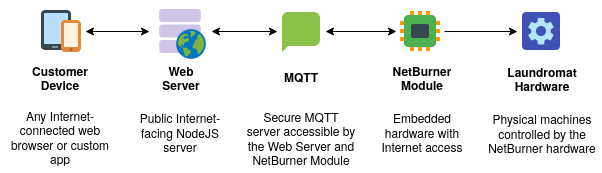
Notice that the Customer doesn’t need to know any details about the physical hardware, like Laundromat IP addresses or networks, and the Laundromat hardware doesn’t need to know anything about the customer. They don’t talk directly and don’t need any special network configurations, they just both talk to a Web Server and MQTT broker “in the cloud” (hosted by a provider like AWS, Azure, Google Cloud, DigitalOcean, etc.) The user experience is seamless in the way people expect nowadays when ordering food for pick-up via an app, or when paying for their groceries via QR code: they might be using their phone to control a retail or electronic experience right in front of their face or a hundred miles away, but their phone is actually talking to an Internet-connected server in a datacenter somewhere else and using real-time lightweight protocols like MQTT, WebSockets, or Web Push behind the scenes to rapidly and cost-effectively exchange messages between all interested parties: this complicated dance can sometimes be accomplished in less than a second and less than a kilobyte, with nearly no unnecessary waiting or requests besides setup and teardown, allowing services to scale to thousands of users for barely any per-user expense.
Also notice that each part of the architecture is doing what it’s good at: customer devices can be mobile, personally identifiable, and network-connected. Customer-facing web servers can be scaled, copied, relocated, configured, updated, and integrated with databases or payment processors or third-party services as desired. The MQTT message broker manages authentication, authorization, and connectivity to all NetBurner modules even when they’re distributed across many locations and behind firewalls with many unknown configurations: some brokers even have rudimentary data storage, security, or device management functions that can help manage the physical hardware “fleet” and associated data. It also naturally separates concerns and security domains between the customer-facing and hardware-facing architecture: customer devices aren’t accessing the Laundromat directly, there’s a secured standards-based plaintext backend that limits the scope of possible actions. It will be very hard, for example, for someone to attack the NetBurner module directly when it’s inside a secured premise network and only responding to text sent over an MQTT channel. Finally, the NetBurner hardware is much more affordable and capable of being deployed on-premise at a laundromat versus a complete computer system. NetBurner devices can speak many customizable industrial protocols or simply toggle electrical signals or relays via GPIO, and operate reliably for years in extreme environments without having to worry about Windows Updates: interfacing with and network-enabling electrical hardware is the NetBurner bread and butter.
Example 2: Laundromat
We’ve chosen to use a laundromat as an stand-in for any remote or nearby user controlling any physical hardware with any network-connected device like a phone or computer. This example could just as easily be about computers or control panels managing industrial or scientific machinery, or simply gathering and reporting on a “fleet” of low-overhead devices in the field! The key is that we’re exploring different protocols and architectures, and the harmonious balance between these different technologies. You’re well on your way to being a “full stack developer,” understanding the whole spectrum of the protocols and languages being used!
This guide assumes that you have some way of running a NodeJS web server in a persistent way (not serverless per-request like with AWS Lambda, but a continually-running Node binary, perhaps behind a reverse web proxy) accessible at a “public” IP/URL that all the above devices can access. For test purposes this can be a computer at home, but in actual deployment a hosted server with a domain name, SSL, and public IP would be expected. Additionally, we assume that MQTT security/authentication, NetBurner hardware/software hardening, customer authentication/authorization, and network security will be handled separately: we’ll only be touching on it briefly. Finally, the embedded code is written for the NetBurner 3.5.4+ NNDK and devices.
Concepts and Strategies
Before we dive into the details, let’s examine why we’re making some of the choices we’ve made.
Questions
First, we’ve got a lot of moving parts and it’s important to get them right. Different people may be working on different parts of this project, so clearly defining each section and who’s responsible for what, with specific “APIs” (agreements on data format, message type, expected responses, errors, etc) will reduce arguments during debugging and prevent big problems later.
For example, where should logic happen? Which parts of the system are authoritative about status and which are simply repeating or caching what something else said? Which parts exert control and which respond to that control?
What protocols and architectures best fit the needs of this scenario, and work within the practical constraints of customers, partners, and internal systems? What happens to this design if one or more parts are rebooted, disconnected, unavailable, corrupted, or attacked?
When choosing languages and frameworks, what are the pros and cons of strongly-typed languages like C++ vs weakly-typed languages like Javascript, and where do we validate and resolve conflicts/errors? What are our assumptions about how these languages should interact?
Since embedded devices are generally stateful (they often persist at least some global variables and electrical states indefinitely) whereas HTTP is stateless (each request contains little or no information about previous requests, and can sometimes even be duplicated) how should we architect around this? Where should state be maintained, retrieved, or ignored, especially when considering high-volume web servers or our backend systems?
Answers
In order to show off the power and ease of the builtin NetBurner MQTT library, we’ve decided to use one mqtt_int for each data point we want to track. This will automatically handle MQTT publishing and subscription to/from named MQTT topics, as well as the conversion of plaintext MQTT data into strict C++ types. Obviously if something invalid is transmitted the local state could become invalid, however the simplicity of the system’s interfaces should prevent anything seriously wrong from happening: choosing an invalid number of credits or an invalid cycle can be easily identified and handled. We’ve chosen not to expose direct control of the machine (there is no “start” or “stop” via MQTT) but rather treat the NetBurner system like an alternative money handler that registers “coins” and customer preferences. The customer will still need to push the physical Start button on the desired laundromat machine, for sanity and safety. Status can then be reported back over MQTT to the customer’s device.
We’ll use a hierarchical naming scheme typical of MQTT for our topic names, with a subscription namespace (“laundryExample”), device ID (“washer/dryer 1/2/etc”), and finally specific device attributes (“credits/cycle/timeLeft”). Topics are simply strings, however MQTT clients and servers are aware of wildcards, so hierarchies like this make it easier to subscribe to something like “laundryExample/#/credits” for a client that only cares about financial details. Debugging clients like MQTT Explorer also tend to show topics in collapsible trees, split on slashes.
On the NetBurner side we’ve also chosen to set “readWriteFlags” on the credits and cycle topics, but “writeOnlyFlags” on the timeLeft topics. This demonstrates some basic security control over the MQTT channel: some other device could broadcast an invalid timeLeft value, which could temporarily confuse other clients, but it wouldn’t affect the NetBurner device’s internal variables. The read-write values are considered a collaboration between both the web server and the NetBurner device: they can be updated by either side, which will notify the other, providing bidirectional communication. If we wanted a little more resilience and reporting, we could have one topic for setting a value (from the web server) and another topic for reporting its current state (from the NetBurner device) but if we don’t need that level of architecture it would still be valid to decide on one side that the “topic” of the number of credits spent on a laundry machine is written, and on the other side that the “topic” is only read, to be clear about the state and responsibilities of the system. We’ve decided not to set the Retain flag in MQTT: the retain MQTT feature will re-publish old values to clients when they connect so that they recover the most recent state on reboot or after disconnection. This can be useful for caching statistics in the system, however it runs the risk of re-issuing old commands we don’t want anymore, or communicating old status information that may not be accurate anymore.
On the web server side, the mqttjs library doesn’t do quite as much work for us, so we do need to manually handle incoming messages/topics and call parseInt() on data coming in from MQTT and toString() on data going out since MQTT is plaintext. We also want to do sanity checking on data coming in from customers or the Internet: we’ll use parse functions and RegEx matching to filter out obvious junk there.
We don’t have a lot of error communication back and forth, though this could easily be added via other MQTT topics that are published or subscribed to as appropriate. For now, most obvious errors are handled internally and output on the serial console or in the HTTP response.
Customer-facing/controlled state is handled in our array of machines inside NodeJS: it authoritatively maintains and publishes changes to the Credits and Cycle topics. Feedback about credit and cycle status from the NetBurner is received on sub-topics for display to the user.
Implementation
- Power Users: If you’re more comfortable with Git and Make than copy/paste and NBEclipse, the code and deployment tools are available on Github as well.
Requirements
Decide on how you’d like to run an MQTT server and set it up. The default “test.mosquitto.org” server with no username/password may work, however it should not be considered reliable or used outside of development tests. Mosquitto.org is sometimes overloaded, so if it doesn’t work consider setting up your own test MQTT server: my personal server is set up through HomeAssistant, and I tend to use AWS IoT Core or Azure Event Grid MQTT for work projects.
Setup
- Install the NetBurner NNDK if you haven’t already.
- Edit
wwwroot/env.distwith MQTT username/password/host and other settings as desired, and save aswwwroot/.env
Note that Docker will need to be rebuilt after any file changes.
Running Web Portion
To run directly, install NodeJS and NPM and run:
- npm install
- npm start
To run via Docker, install Docker and run:
- docker build . -t laundromat
- docker run -p 8000:8000 -it laundromat
Rebuild and re-run if you make any source code or configuration changes.
Running Embedded portion
Copy-paste into a NBEclipse project or run make load -e DEVIP=192.168.1.100(changing the IP to match your NetBurner device)
To find your device’s IP, you can visit https://discover.netburner.com
If you encounter error messages about missing header files, ensure that your other environment variables like NNDK_ROOT and PLATFORM are set properly. You can always provide them on the command line like make load -e PLATFORM=SOMRT1061 -e DEVIP=192.168.1.100
Final steps
1. Finish configuring your NetBurner device by going to i.e. http://192.168.1.100:20034 and setting the following options under MqttClient:
- ClientId (i.e.
laundromat-test) - Hostname (i.e.
test.mosquitto.orgor the IP/Domain of your MQTT server) - Password (password of your laundromat-test MQTT user, if any)
- Port (default 1883 for unencrypted, or 8883 for encrypted)
- TLS_Enabled (check if encrypted)
- Username (i.e.
laundromat-test, if any)
Note some MQTT servers (“brokers”) will disconnect clients with duplicated usernames and/or client IDs, so if you have issues with immediate disconnections try making a separate username (and client ID) for each client. The web and embedded portions of this project each count as one client, so use different Client IDs for each.
2. Click Update Record to save. Reboot your NetBurner device so the settings take effect.
3. Connect a serial console to your NetBurner device and notice the output:
Primary network interface configured for DHCP
MAC Address = 00:03:f4:12:34:56
Type "A" to abort boot
Application started
NotConnected
NotConnected
Connected.
Machine 0 is OFF [0 credits, 0 cycle, 0 time left]
Machine 1 is OFF [0 credits, 0 cycle, 0 time left]
Machine 2 is OFF [0 credits, 0 cycle, 0 time left]
Machine 3 is OFF [0 credits, 0 cycle, 0 time left]
You can press 0, 1, 2, or 3 to add “credits” to a machine, and S to start the machine(s). The status will be sent up via MQTT to the web app.
4. Visit the webpage of your web app: http://localhost:8000

- If this doesn’t work, double check your Docker networking settings and firewalls.
- You can also run the project directly with NodeJS via npm.
- The port number should appear in your system’s “listening ports” output.
- You can try
netstat -an | grep 8000on Linux, Mac, and Windows Powershell.
You can select a cycle and press Start to start a machine, and the status/request will be sent via MQTT to the NetBurner.
Wrapping Up
And that’s it! You have a working client-server application where multiple web clients like mobile phones can contact a web server (run by NodeJS) which talks to an embedded backend (run on the NetBurner hardware) over an industry standard MQTT channel. This architecture can level up your ability to provide professional solutions to end-users who are used to “an app for that” without having to mess around with on-site IP addressing, firewalls, or port forwarding.
Please play around with the code and make it your own! Hopefully this series has helped bridge the gap between the embedded and web development ecosystems, and some of the architectural considerations are easier to grasp on both sides.