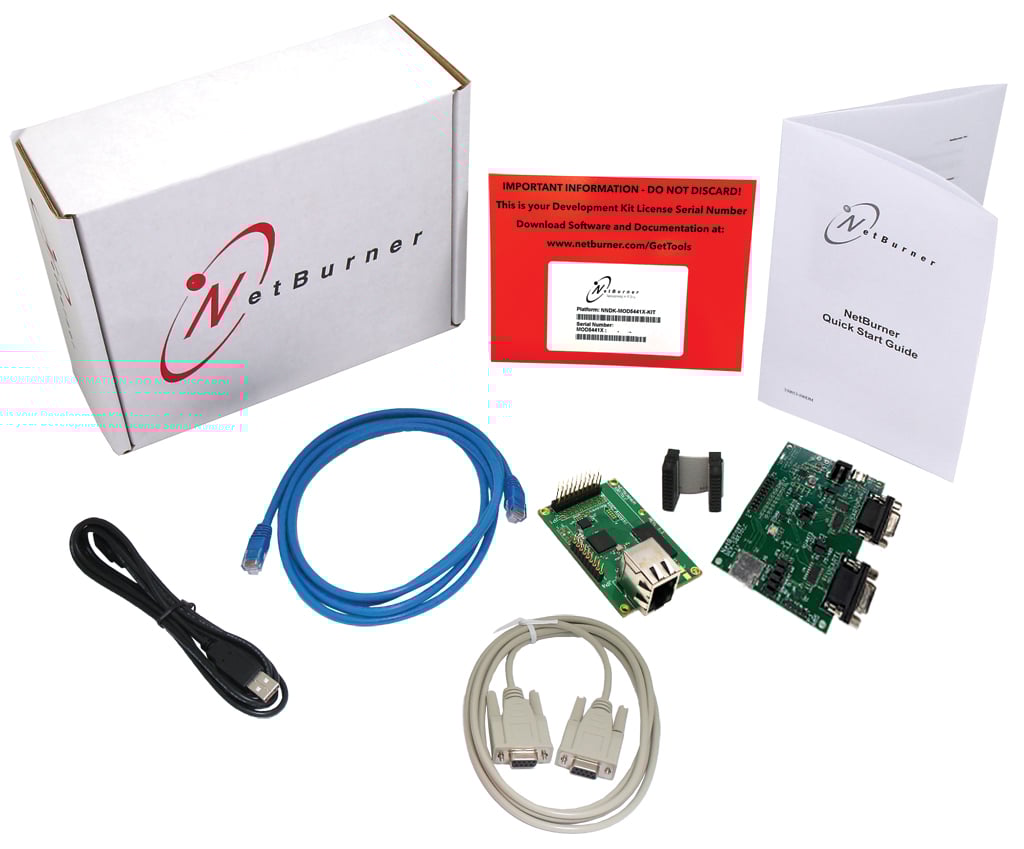
SBE70 LC Development Kit

$119.00

NetBurner’s Secure Serial to Ethernet Servers add networking to serial devices out of the box – no programming or development is required. The hardware is pre-programmed to convert your serial data to Ethernet, enabling secure communication with the serial device over a network or the Internet.

The SBE70 LC is an upgrade for the SB70 LC.

In Stock

SKU: NNDK-SBE70LC-KIT Category: Tags: ,

Description

Icon

SBE70 LC Datasheet 501.02 KB 10310 downloads

Included in the Package

  • 1 Platform Hardware
  • 1 Development Board (new DEV-SBE70LC-100CR as of 2025!)
  • 1 Ribbon Cable
  • 1 Quick Start Guide
  • 1 NNDK Card with Platform Serial Number
  • 1 USB-C Cable
  • 1 Serial Cable
  • 1 Blue CAT5 Patch Cable
  • 1 Year of Software and Tool Updates
  • 6 Months of Technical Support


Ready to build products?

Take a look at volume pricing for the SBE70 LC. Click here for additional product information.

NOTE: These kits are USB powered (with the included USB cable), but can also be powered by a power adapter which can be purchased here: International Power Adapter or a US Power Adapter

Specifications

Performance and Memory
Processor Family

ARM

Clock Speed

300 MHz

Flash

2 MB

SDRAM

8 MB

Device Connectivity
DHCP/Static IP modes

Yes

Ethernet

10/100 Mbps

Flash Card Support (SDHC/SPI)

Ready

GPIO

15

I2C

1

RS-232

Requires external level shifter

RS-422/485

Requires external level shifter

SPI

1

TCP/UDP/Telnet Modes

Yes

Timer I/O

1

UART

2

Wifi Interface

Optional

Additional Peripherals
SSH, SSL/TLS, HTTPS Certificate Support

Yes

Module Properties
Dimensions

2.70" x 1.75" (inches)

DC Input Voltage

3.3V @ 250mA typical

Temperature Range

Industrial (-40°C to 85°C)

Brand

NetBurner

More
Weight

2 lbs

Documents and Downloads

SBE70 LC Online Guides

SBE70 LC Quickstart Guide

NNDK 3.X Quickstart Guide

NNDK 3.X Documentation

SBE70 LC Datasheet

Icon

SBE70 LC Datasheet 501.02 KB 10310 downloads

    SBE70 LC Documents

    Icon

    SBE70LC Development Board Schematic: DEV-SBE70LC-100CR 430.16 KB 1047 downloads

    Icon

    SBE70LC Latest Factory Application Firmware 752.83 KB 1067 downloads

    Icon

    ARM Cortex-M7 Processor Technical Reference Manual 1.04 MB 18944 downloads

    Icon

    ARMv7-M Architecture Reference Manual 5.80 MB 12556 downloads

    Icon

    Standard Serial Tunneling 0.00 KB 52147 downloads

    Icon

    Secure Serial Factory App User's Manual 2.59 MB 37695 downloads

    Icon

    SB70LC (EOL) Adapter Board Schematic: SB70LC-ADPT-100CR 95.28 KB 13720 downloads

    Icon

    Adding an Ethernet RJ-45 Connector 0.00 KB 50315 downloads

      Development Kit

      Icon

      SBE70 LC STEP Files 10.75 MB 4827 downloads

      STEP files for both versions of the SBE70 LC module. Find out more about this module on its product page.

      Icon

      macOS Big Sur PCN 0.00 KB 113354 downloads

      Icon

      SAM E70/S70/V70/V71 DataSheet 0.00 KB 10082 downloads

      Icon

      SAM E70/S70/V70/V71 Reference Manual 0.00 KB 10263 downloads

      Icon

      SAM E70/S70/V70/V71 Errata 0.00 KB 8329 downloads

      Icon

      Custom Baud Rates 0.00 KB 111254 downloads

      Icon

      Comparing RTOS to Infinite Loop Designs 0.00 KB 113181 downloads

        Deployment Tools

        Icon

        MTTTY Download 0.00 KB 189709 downloads

        Multi-Threaded TTY (MTTTY) is an easy to use serial terminal utility that you can use to communicate with the RS-232 serial ports on your device or development kit. It is multi-threaded in that you can run multiple instances of MTTTY for each serial port.

        Icon

        MTTTY Serial Terminal 0.00 KB 126989 downloads

        Icon

        AutoUpdate (Windows) 0.00 KB 116223 downloads

        The NetBurner AutoUpdate download for Windows. Get the OSX version here.

        Read more about our deployment tools including AutoUpdate here.

        Icon

        AutoUpdate (OS X) 0.00 KB 106100 downloads

        Icon

        IP Setup 0.00 KB 179081 downloads

        IPSetup is a Windows program used to configure NetBurner hardware through a network connection. Running IPSetup will automatically identify your NetBurner device (even if its IP address is 0.0.0.0).

          Application Notes

          No downloads found!