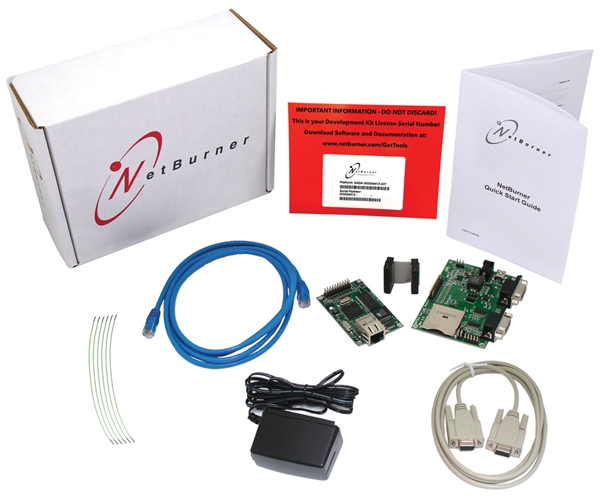
PINK LC Development Kit (3.3V Version)

$130.00

Send email, generate custom web pages, send and receive network data.

The NetBurner PINK LC Development Kit adds web server capability to your microcontroller enabling it to communicate over a network or even the Internet. It supports over 100 web-accessible variables, allowing for dynamic web pages. Features include a ftp web server for web pages and files, sending e-mail, UDP messages to alert you to events or provide status messages, and much more. Communication with the host controller is done using a simple TTL serial interface.

Out of Stock

Description

Icon

SB70LC Datasheet 869.31 KB 37699 downloads

Included in the Package

  • 1 Platform Hardware (PINK70 LC and Development Board)
  • 1 NNDK Card and Platform Serial Number
  • 1 Blue CAT5 Patch Cable
  • 1 Red CAT5 Cross-over Cable
  • 1 Grey Serial Cable
  • 1 Power Adapter (US or International Version)
  • 1 Adapter Board Connector Ribbon
  • 1 Adapter Board
  • 6 Hookup Wires

Ready to build products?

Take a look at volume pricing for the PINK70 LC. Click here for additional product information

Note: If you need the 5V version of this device, please see the PINK70 Development Kit product page.

Specifications

Performance and Memory
Clock Speed

147.5 MHz

Flash

512 KB

SDRAM

8 MB

Device Connectivity
DHCP/Static IP modes

Yes

Ethernet

10/100 Mbps

Flash Card Support (SDHC/SPI)

Ready

GPIO

15

I2C

1

RS-232

Requires external level shifter

RS-422/485

Requires external level shifter

SPI

1

TCP/UDP/Telnet Modes

Yes

Timer I/O

1

UART

2

Additional Peripherals
SSH, SSL/TLS, HTTPS Certificate Support

Yes

Module Properties
Dimensions

2.70" x 1.75" (inches)

DC Input Voltage

3.3V @ 250mA typical

Temperature Range

Industrial (-40°C to 85°C)

More
Weight

2 lbs

Documents and Downloads

PINK70 LC Documents

Icon

PINK70 LC Latest Factory Application Firmware 0.00 KB 4349 downloads

Icon

PINK70 LC Quick Start Guide 0.00 KB 4185 downloads

Icon

PINK70 / PINK70 LC User's Manual 0.00 KB 7420 downloads

Icon

Adding an Ethernet RJ-45 Connector 0.00 KB 62929 downloads

    Development Kit

    Icon

    macOS Big Sur PCN 0.00 KB 147723 downloads

    Icon

    Custom Baud Rates 0.00 KB 143253 downloads

    Icon

    uCOS Library 0.00 KB 161239 downloads

    Icon

    SerialDownload Pdf 0.00 KB 157031 downloads

    Icon

    Writing Assembly Code for the NetBurner Coldfire Platform 0.00 KB 156711 downloads

    Icon

    Comparing RTOS to Infinite Loop Designs 0.00 KB 145196 downloads

    Icon

    Network Security Libraries 0.00 KB 156258 downloads

    Icon

    Network Programming Examples 0.00 KB 152235 downloads

    Icon

    Network Programming Guide 0.00 KB 143399 downloads

    Icon

    Debugging Network Communications 0.00 KB 108013 downloads

    Icon

    NNDK Installation Notes 0.00 KB 65335 downloads

    Icon

    Reference Guide: NetBurner PC Tools 0.00 KB 45916 downloads

    Icon

    Runtime Libraries 0.00 KB 49063 downloads

    Icon

    Getting Started Guide: NetBurner's Eclipse IDE (NBEclipse) 0.00 KB 53935 downloads

    Icon

    Freescale Coldfire MCF5271 Errata 0.00 KB 16272 downloads

    Icon

    Freescale Coldfire MCF5271 Reference Manual 0.00 KB 16859 downloads

    Icon

    Freescale Coldfire MCF5271 Hardware Specification 0.00 KB 16344 downloads

      Deployment Tools

      Icon

      MTTTY Download 0.00 KB 225483 downloads

      Multi-Threaded TTY (MTTTY) is an easy to use serial terminal utility that you can use to communicate with the RS-232 serial ports on your device or development kit. It is multi-threaded in that you can run multiple instances of MTTTY for each serial port.

      Icon

      MTTTY Serial Terminal 0.00 KB 167572 downloads

      Icon

      AutoUpdate (Windows) 0.00 KB 151283 downloads

      The NetBurner AutoUpdate download for Windows. Get the OSX version here.

      Read more about our deployment tools including AutoUpdate here.

      Icon

      AutoUpdate (OS X) 0.00 KB 139978 downloads

      Icon

      IP Setup 0.00 KB 220794 downloads

      IPSetup is a Windows program used to configure NetBurner hardware through a network connection. Running IPSetup will automatically identify your NetBurner device (even if its IP address is 0.0.0.0).

        Application Notes

        Icon

        SB70LC / PINK70 LC General Purpose I/O 0.00 KB 15425 downloads

        Icon

        SB70LC / PINK70 LC Pin I/O Class 0.00 KB 15956 downloads

        Icon

        SB70LC / PINK70 LC Pin I/O Class 0.00 KB 16526 downloads

        Icon

        SB70LC / PINK70 LC General Purpose I/O 0.00 KB 14884 downloads

        Icon

        Certificates and Keys 0.00 KB 38232 downloads

        Icon

        How to Increase User Flash Storage 0.00 KB 25222 downloads